



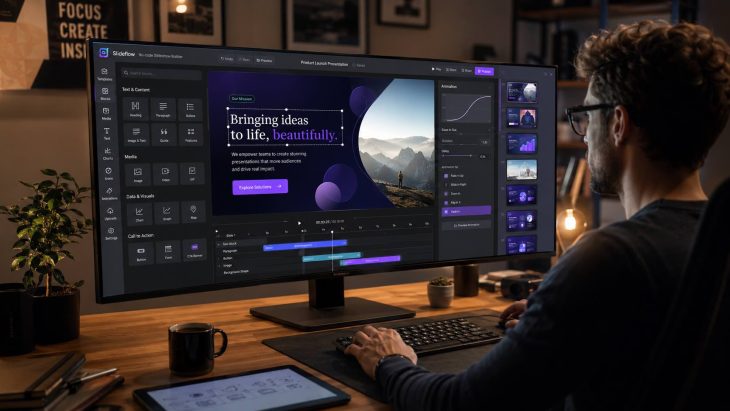
Digital presentation tools have transformed how we share information, making it easier to create engaging and interactive content. PowerPoint, Google Slides, Prezi, and modern animated slideshow builders offer a range of features that help users create more dynamic visual experiences. These tools allow users to incorporate multimedia elements like videos, images, and animations, making content more dynamic and memorable. They also provide templates and design options to help even the most design-challenged individuals create professional-looking slides. With cloud-based options, collaboration has never been easier, enabling multiple users to work on a presentation simultaneously. Whether for school projects, business meetings, or creative storytelling, digital presentation tools are indispensable in today’s tech-savvy world.
Digital Presentation Tools: A Game Changer
Digital presentation tools have revolutionized the way we share information. From classrooms to boardrooms, these tools make it easier to create engaging, interactive presentations. Let’s dive into some fascinating facts about these tools.
- PowerPoint, launched in 1987, was the first digital presentation tool and remains widely used today.
- Google Slides, part of Google Workspace, allows real-time collaboration, making it a favorite for team projects.
- Prezi offers a unique, non-linear presentation style, allowing users to zoom in and out of their content.
- Canva, known for its graphic design capabilities, also provides robust presentation features with customizable templates.
- Keynote, Apple’s presentation software, is praised for its sleek design and seamless integration with other Apple products.
The Evolution of Presentation Tools
Presentation tools have come a long way since the days of overhead projectors. Modern tools offer features that were unimaginable a few decades ago.
- SlideShare, acquired by LinkedIn, allows users to share presentations online, reaching a global audience.
- Haiku Deck simplifies the design process with a focus on visual storytelling.
- Visme combines presentation capabilities with infographics, making it a versatile tool for data visualization. The rise of visual-first platforms also reflects broader trends seen in virtual reality technology, where immersive digital experiences are becoming increasingly important for communication and engagement.
- Zoho Show integrates with other Zoho apps, providing a comprehensive suite for business users.
- Beautiful.ai uses artificial intelligence to help users create professional-looking slides effortlessly.
Enhancing Engagement with Interactive Features
Engagement is key to a successful presentation. Modern tools offer interactive features that keep audiences hooked.
- Mentimeter allows presenters to create interactive polls, quizzes, and Q&A sessions in real-time.
- Slido integrates with popular presentation tools to add live polls and audience interaction.
- Poll Everywhere turns audience responses into real-time charts and graphs, enhancing engagement. Many of these interactive capabilities are powered by advances in artificial intelligence, which continue to improve audience analysis, automation, and personalized presentation experiences.
- Microsoft Sway offers a dynamic, web-based presentation format that adapts to different devices.
- Emaze provides 3D templates and animations, making presentations visually stunning.
Accessibility and Convenience
Accessibility and convenience are crucial for users who need to create presentations on the go or collaborate remotely.
- Microsoft PowerPoint Online offers cloud-based access, allowing users to work from anywhere.
- Google Slides can be accessed offline, ensuring users can work without an internet connection.
- Canva’s mobile app allows users to create and edit presentations on their smartphones.
- Prezi Video lets users create video presentations, perfect for remote meetings and virtual classrooms.
- SlideDog combines various media formats into one seamless presentation, enhancing flexibility.
Advanced Features for Professionals
Professional users often require advanced features to meet their specific needs. Many digital presentation tools cater to these demands.
- Adobe Spark offers advanced design tools and integration with Adobe Creative Cloud.
- Powtoon specializes in animated presentations, making it ideal for marketing and educational content.
- Vyond allows users to create animated videos, adding a dynamic element to presentations.
- Pitch, designed for startups, offers collaboration features and templates tailored for pitching ideas.
- Ludus focuses on creative professionals, offering advanced design capabilities and integrations with other design tools.
The Future of Digital Presentations
The future of digital presentations looks promising, with continuous advancements in technology and user experience.
- Augmented reality (AR) is being integrated into presentation tools, offering immersive experiences.
- Virtual reality (VR) presentations are becoming more common, providing a new way to engage audiences.
- AI-driven design suggestions are helping users create more effective presentations with less effort.
- Voice recognition technology is being incorporated, allowing hands-free control of presentations.
- Blockchain technology is being explored to ensure the security and authenticity of digital presentations. Organizations such as the National Institute of Standards and Technology continue to study evolving digital technologies and cybersecurity practices.
Final Thoughts on Digital Presentation Tools
Digital presentation tools have transformed how we share information. From PowerPoint to Prezi, these tools offer unique features that cater to different needs. PowerPoint remains a staple for its versatility and ease of use. Prezi stands out with its dynamic, zoomable canvas, making it perfect for storytelling. Canva brings design to the forefront, allowing even non-designers to create visually stunning slides. Google Slides offers seamless collaboration, ideal for team projects. Keynote provides a polished, professional look, especially for Apple users. Each tool has its strengths, so choosing the right one depends on your specific needs. Whether you’re a student, teacher, or business professional, there’s a digital presentation tool out there to help you communicate your ideas effectively. Embrace these tools to enhance your presentations and captivate your audience.
Was this page helpful?
Our commitment to delivering trustworthy and engaging content is at the heart of what we do. Each fact on our site is contributed by real users like you, bringing a wealth of diverse insights and information. To ensure the highest standards of accuracy and reliability, our dedicated editors meticulously review each submission. This process guarantees that the facts we share are not only fascinating but also credible. Trust in our commitment to quality and authenticity as you explore and learn with us.